summer 2019? here you go.
Find photos by date taken – narrow down by month and year
A file’s date often says little: after downloading, editing or sending, it shows a different day from the one the photo was taken. The day it was taken is stored in the camera data inside the photo. Album 42 reads this date taken and narrows your photos down by it: two handles, and you only see the pictures from those months. On Windows 11 and on the Mac, also for photos on external drives.
How to find photos by date taken
Scan
Scan a folder or drive. Album 42 reads the date taken from every photo along the way.
Click “Date range”
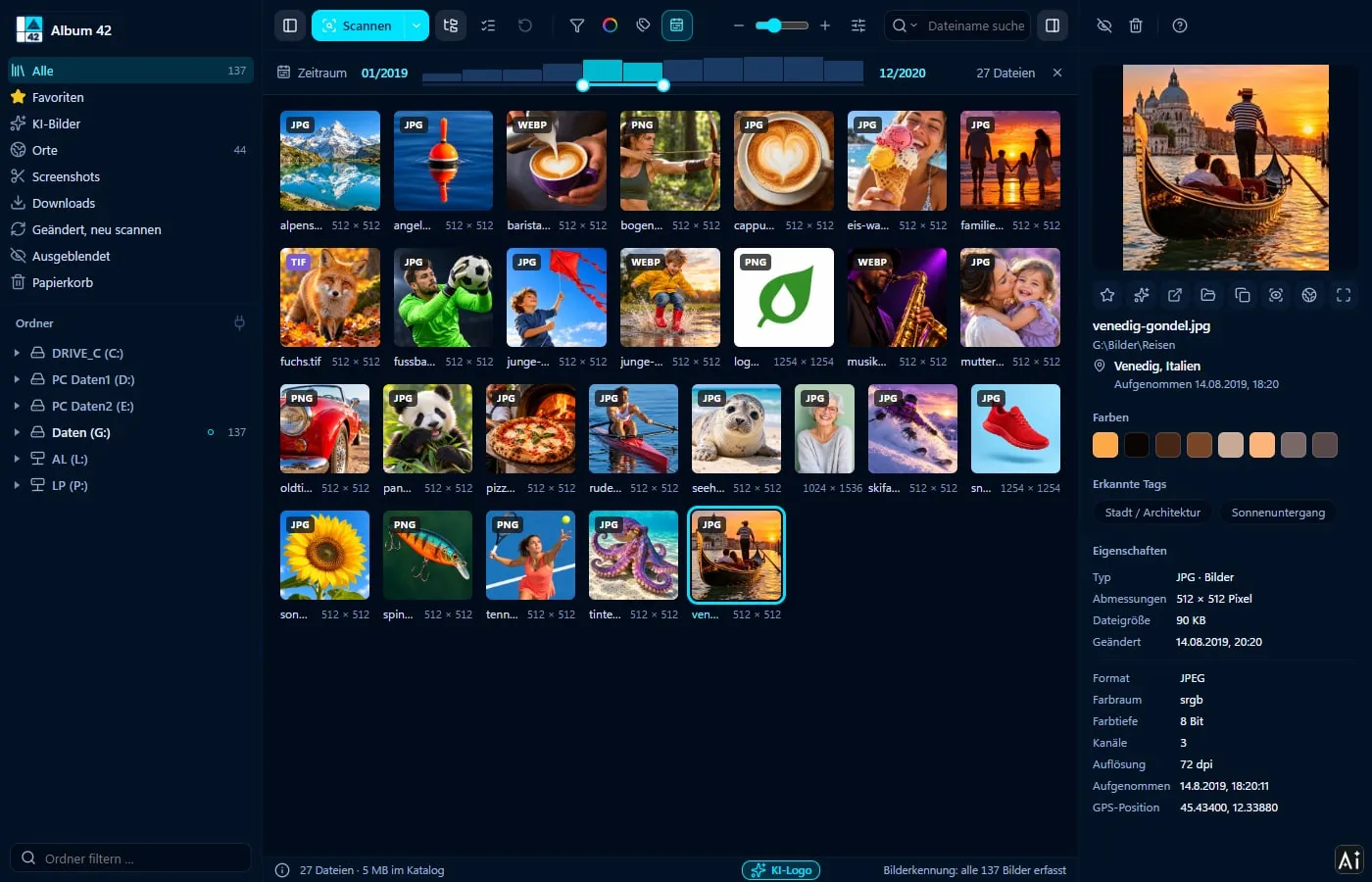
The button at the top shows a bar: the oldest date on the left, the newest on the right, with columns showing how many pictures there are per year or month.
Drag the handles
The two handles set month and year. On the right you see how many files are in the range.
Date taken or modified date?
The date range uses the date taken from the camera (EXIF). Files without one, such as graphics or screenshots, are placed by their modified date. If a handle sits right at the edge, files with an obviously wrong date are included too, for example before 1971 or in the future.
You choose the order of the pictures in the “View” menu: by name, date, file size or resolution. “Date” there is the file’s modified date.
Combine with location and search
The date range works together with everything else: with the AI search, with colour and tags and with the world map. In the “Places” view the bar sits above the map, and the map only shows the photos from those months. Spain, August 2019: two moves.
The date taken of every photo
Click a photo: the detail panel shows the date and time taken, for phone photos also the place, plus camera, lens and exposure. Album 42 reads this from JPG, TIFF, HEIC and the common camera RAW formats.
The date stays as it is
Album 42 changes no dates. If you drag photos into another folder, even onto another drive, they keep their modified date. If you rotate or straighten a photo in the viewer, date taken and GPS position stay in the picture when you save.
Frequently asked questions
Can I sort photos by date taken?
Album 42 narrows down by date taken: with “Date range” you choose month and year, and only the photos from that time remain. When sorting by date, the order in the grid follows the file’s modified date.
What if a photo has no date taken?
Then the file’s modified date counts. The same applies to graphics, screenshots and other files without camera data.
Does Album 42 change the date of my photos?
No. Even when moving to another drive, the modified date is kept, and when rotating, date taken and GPS stay in the picture.
Does this work with photos on an external hard drive?
Yes. Everything you have scanned is included in the date range, even drives that are not connected right now.
Does it run on Windows 11 and on the Mac?
Yes – on Windows 10 and 11 (64-bit) and on macOS 12 or later, on Macs with Apple silicon and with Intel processors.
Try it free for 28 days
No sign-up, no subscription. If you like Album 42, you pay €29 once – including all updates of version 1.
More guides
- How to sort photos on your PC – into folders, by date, colour and topic
- Sort photos by location – every place you took a photo, on a world map
- Find and delete duplicate photos – and similar ones too
- Open HEIC files on Windows 11 – view iPhone photos without an extension
- Search photos on your PC – with AI by content, place and date
- Thumbnails not showing in Windows 11? Previews for 81 formats
- Create an image database – all your pictures in one catalogue
- Save screenshots and clipboard images automatically
- AI photo tagging – sort photos with AI automatically
- Label AI images – with logo and metadata, on the copy only
- Find photos on an external hard drive – even when it isn’t connected
- Fast photo viewer for Windows 11 and Mac
- PSD thumbnails in Windows? View Photoshop files without Photoshop
- CDR viewer – open CorelDRAW files without CorelDRAW
- EPS, AI and SVG thumbnails on Windows 11 and Mac
- View RAW files on Windows 11 and Mac
- Photo organizer for Mac – all pictures, all drives, 81 formats
- ThumbsPlus alternative for Windows 11 and Mac